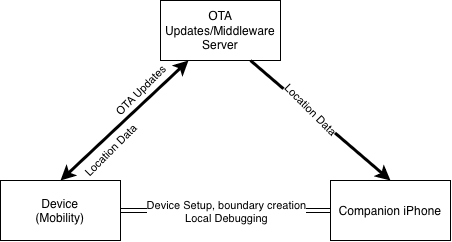
Over the past year, the Technology Helping People team has been working hard on the software of the Alzheimer’s project.The software can be split into three components: The device’s firmware, the middleware server, and the iPhone app.
The Device’s Firmware
The device runs a customized version of the open source operating system FreeRTOS, with benefits such as symmetric multitasking (For serving the web server, sending location and downloading OTA updates concurrently), a strong TCP stack (reliable connections to the middleware server), and small footprint (The entire system comes in just under a megabyte.)
The device (if outside safe boundary limits) will send its location to the server, encrypted using the device’s unique serial number and password, ensuring the server cannot read any location data (The server does not, at any point, receive the unique password.) When sending its location, the device will first try to use GPS to locate itself, which is accurate down to about 4 feet. If the person is inside a building with poor GPS signal, the device will attempt to triangulate the person’s location based on nearby cell towers that the modem scanned, which is accurate down to about 100 feet.
Since the footprint of FreeRTOS is very small, the device is able to house two partitions of the same software, an active and a backup partition. If the device loses power suddenly during a write to the flash, for example battery failure during a firmware update, on the next restart during the system’s self-check sequence it will automatically load the backup partition and start downloading the latest software back to the active partition. After the download is complete, it will restart into the active partition.
The server
The server is a small piece of software that manages data transfer between the iPhone app and the device. It only has two functions – Hand data from the device to the iPhone when needed, and push updates to the device when the device is on an old version. Once the iPhone requests data from the server, the server immediately deletes the location data stored for privacy.
The iPhone app

The iPhone application shows caretakers when the person has walked outside of a safe boundary, and sends notifications when that occurs. The caretaker can also get directions to the person’s last known location using one click.
When nearby the device, the iPhone application can perform initial onboarding setup, select safe boundaries where the device doesn’t send location data, and locally debug issues with the modem.
Leave a Reply